Workbench — Game Design Document
The hideout's crafting station, built around recipe knowledge you earn rather than unlock.
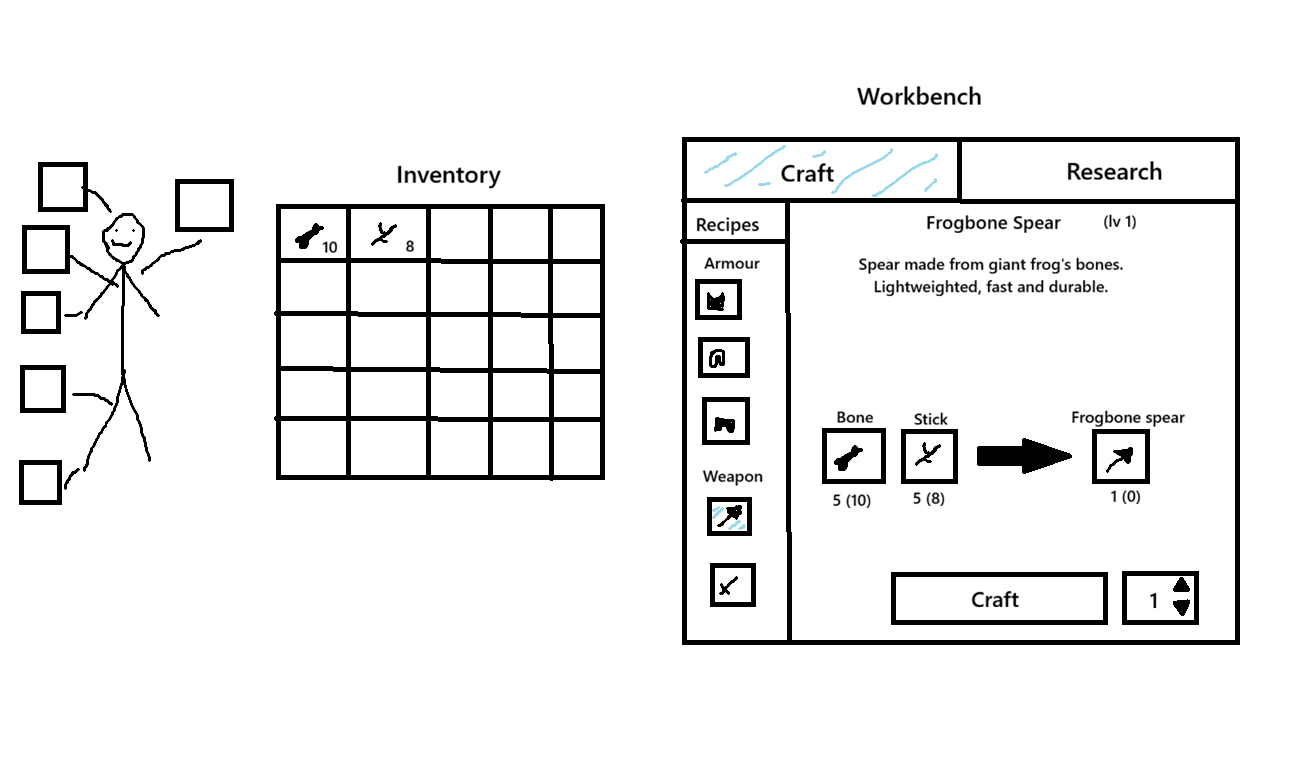
A full GDD for the Workbench module of Mortalis — the hideout's production station. Covers the crafting workflow, a shared inventory/storage resource pool, and a recipe-research system where crafting knowledge is discovered and earned rather than handed out.
Made for Mortalis Game — included here with attribution, per the studio agreement.
About this document
I wrote and designed this GDD as a game designer on the Mortalis team — the crafting and research systems, the interface flow, and the document itself. It’s shown here in full; the parts I’d point to first:
- Knowledge is earned, not given. Recipes are discovered through exploration, quests, and experimentation rather than unlocked automatically — crafting knowledge becomes a progression resource.
- One resource pool. Crafting draws from inventory and storage together, so players don’t shuffle materials just to build.
- Two modes, one station. Crafting (making items from known recipes) and Recipes & Research (discovering and completing them) live side by side.
The complete design document follows.
Workbench is one of the Hideout modules. It allows players to craft equipment, consumables, furniture and other useful items between arena runs.
The Workbench serves as the primary production station inside the Hideout. Through crafting and recipe discovery, players convert gathered resources into valuable equipment and progression.
The module combines resource management, crafting and knowledge acquisition into a single progression system.
Core Concept
The Workbench is designed around the idea that crafting knowledge is earned rather than freely available.
Instead of receiving every recipe automatically, players gradually build their crafting library through exploration, quests, NPC interactions and experimentation.
The system is built around four pillars:
- Crafting as progression — players convert resources into useful items.
- Knowledge as reward — recipes are valuable discoveries rather than automatically unlocked content.
- Experimentation and discovery — players can uncover new recipes through gameplay.
- Workbench progression — upgrading the station unlocks more advanced crafting possibilities.
System Structure
The Workbench system consists of 3 parts:
Workbench [this part] — module progression, interaction flow, visuals and UI structure.
Recipes & Research Part — recipe acquisition, recipe journal, recipe discovery and research mechanics.
Crafting Part — crafting workflow, resource consumption, crafting queue, hotkeys and edge cases.
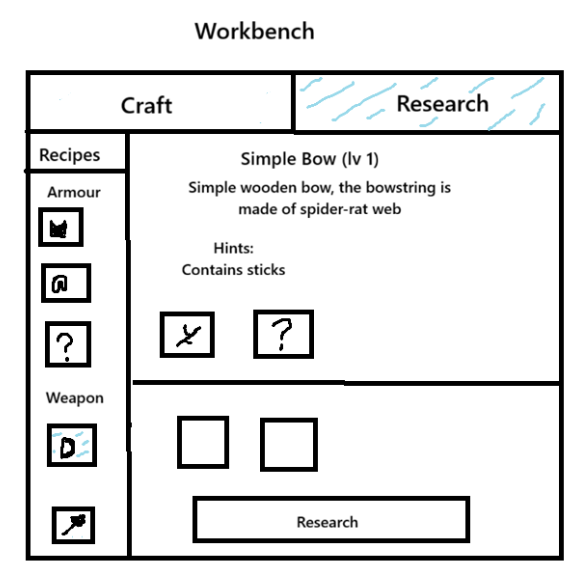
Interface Structure
The Workbench screen is divided into two main sections displayed side by side:
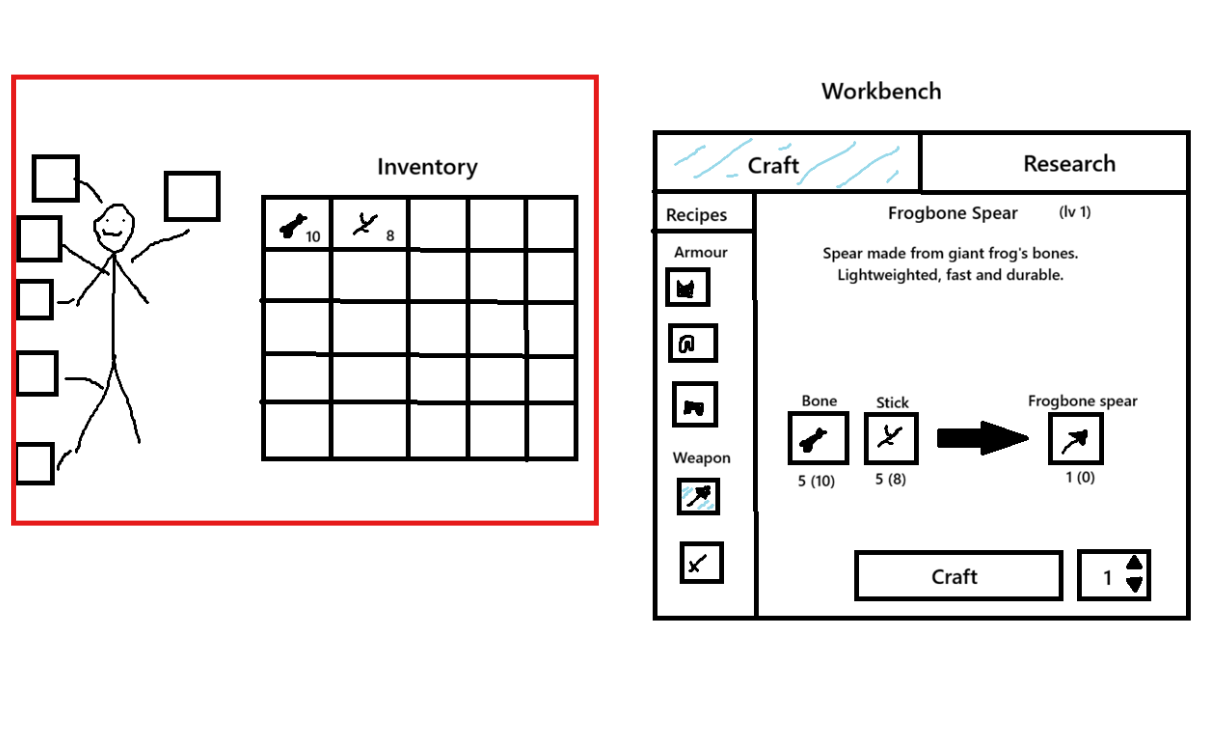
Character Inventory Panel (Left)
Displays all player-owned items available for crafting.
The player can review, move and inspect items without leaving the Workbench interface.
All materials stored in either Inventory or Storage are automatically available for crafting and research, however storage items are not directly shown not to overload the interface.
The system treats both sources as a single resource pool while the Workbench is open.
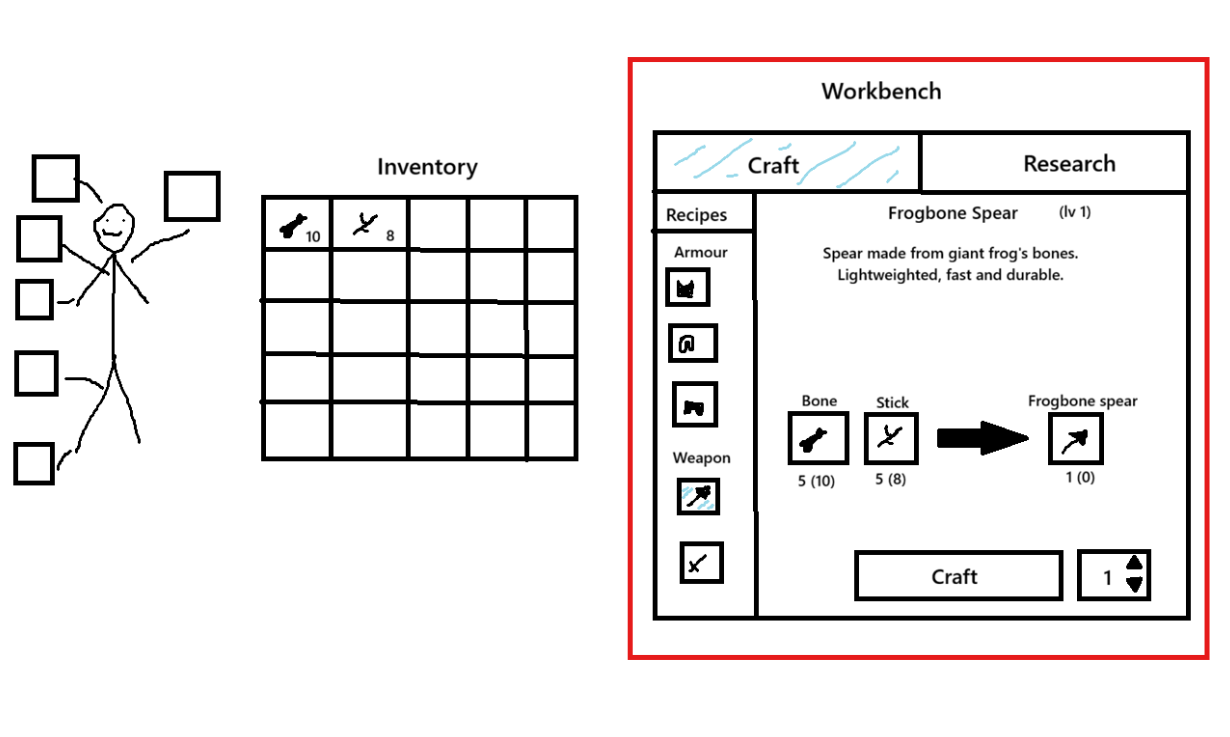
Workbench Panel (Right)
Displays the currently selected Workbench functionality.
The panel contains two modes:
- Crafting
- Recipes & Research
Players can switch between modes using tabs located at the top of the panel.
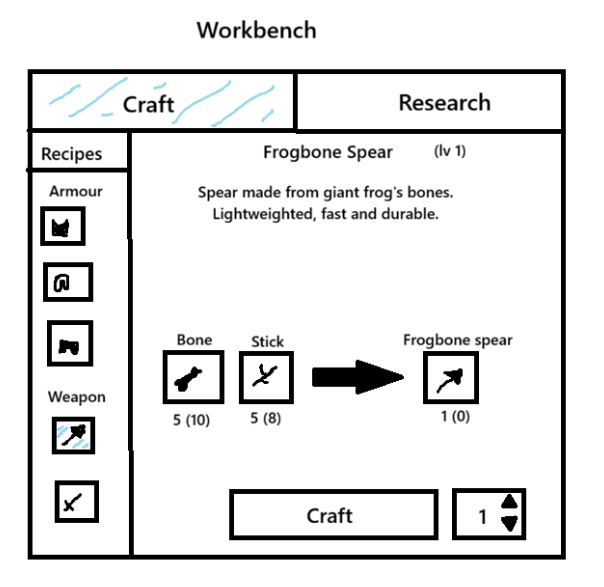
Crafting Mode
Used for creating items from known recipes.
The panel displays:
- Available recipe categories
- Known recipes
- Name of chosen recipe
- Level of workbench needed for craft
- Recipe description
- Required ingredients
- Crafting cost
- Craft result preview
- Craft button
Only fully learned recipes can be crafted.
Detailed crafting behavior is described in the Crafting Part document.
Recipes & Research Mode
Used for managing recipe knowledge and discovering new recipes.
The panel displays:
- Learned recipes
- Partially discovered recipes
- Recipe fragments
- Research slots
- Research controls
- Discovery information
Players can use this mode to track crafting knowledge and perform recipe research.
Detailed research behavior is described in the Recipes & Research Part document.
Access & Interaction
How to Open Workbench
Requirement
- Completes the tutorial.
- Creates a Workbench module via the Hideout Terminal.
Action
- Walks up to the Workbench in the Hideout.
- Presses [Interact].
Result
- Workbench screen opens.
- Inventory becomes visible.
- Storage resources become available.
- Workbench remains visible behind the UI.
- Player movement and interaction controls are disabled.
Workbench Progression
The Workbench module can be upgraded through the Hideout Terminal.
Upgrading improves both the visual state of the workshop and its functionality.
| Module Level | Research Slots | Items destruction chance | Max Recipe Tier | Workbench State |
|---|---|---|---|---|
| Level 1 | 2 | 20% | Tier 1 | Improvised workbench assembled from scavenged parts. |
| Level 2 | 3 | 10% | Tier 2 | Organized workstation with basic tools and storage. |
| Level 3 | 4 | 5% | Tier 3 | Fully operational workshop with advanced equipment. |
Progression Goals
Workbench upgrades provide:
- Access to higher-tier recipes.
- Additional research slots.
- Reduced research failure penalties.
- Access to advanced crafting categories.
Detailed functionality is described in the Recipes & Research Part and Crafting Part .
Scene & Audio
Scene
- The Workbench is located inside the Hideout.
- When interacting with the Workbench, the workshop remains visible behind the UI.
- The visual appearance changes based on module level.
- Additional tools, equipment and decorations appear as the Workbench is upgraded.
Audio
Interaction
- Workbench open sound.
- Workbench close sound.
- UI navigation sounds.
Crafting
- Tool handling sounds.
- Material placement sounds.
- Craft completion sound.
Research
- Research start sound.
- Discovery sound.
- Research failure sound.
Crafting Part
The Crafting Part covers all mechanics related to creating items at the Workbench.
Unlike the Recipes & Research system, Crafting does not involve recipe discovery. It is used exclusively for producing items from recipes that have already been learned.
The player selects a learned recipie, reviews its requirements and crafts the desired item.
Crafting Interface
Crafting is performed through the Crafting tab of the Workbench.
The screen is divided into two sections.
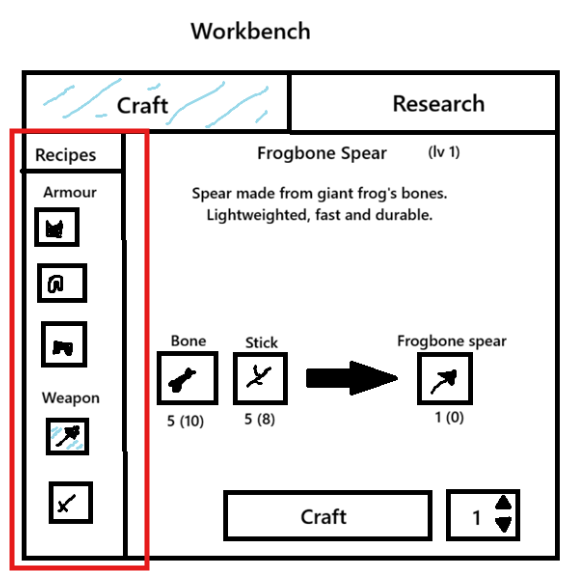
Recipes Panel (Left)
Displays all player-owned recipes available for crafting by categories. Recipes that are not yet fully discovered aren’t showed.
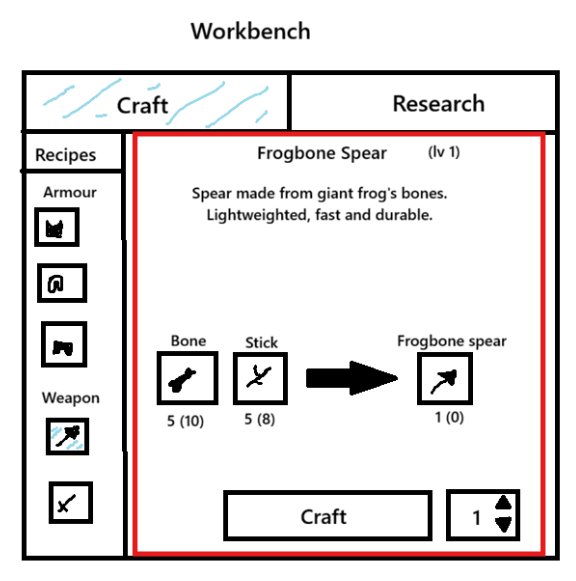
Crafting Panel (Right)
Displays information about the selected recipe.
The panel contains:
- Recipe description
- Required ingredients
- Available ingredient count
- Craft result preview
- Craft button
Recipe Categories
Recipes are grouped into categories.
Example categories:
- Weapons
- Armor
- Consumables
- Ammo
- Resources
- Furniture
Recipe Selection
Action
Player selects a learned recipe from the recipe list.
Result
The Crafting Panel updates and displays:
- Recipe name
- Description
- Crafted item preview
- Required ingredients
- Available ingredient counts
Example:
Stone Spear\n\nA primitive spear useful for hunting.\n\nRequirements:\n\n✓ 1 Stick (Available: 12)\n✓ 1 Stone (Available: 8)\n\nResult:\n\n1 Stone Spear
Crafting Item
Requirement
- Recipe is Learned.
- Player has all required materials in inventory or in storage.
- Workbench level meets recipe tier requirement.
Action
Player presses Craft.
Result
- Required materials are consumed.
- Crafted item is created.
- Crafted item is added to Inventory.
- Crafting sound is played.
Missing Materials
Requirement
Player lacks one or more required ingredients.
Action
Player presses Craft.
Result
- Crafting is blocked.
- Materials are not consumed.
- Warning message is displayed.
Example:
Missing Materials\n\nRequired:\nStone x2\n\nAvailable:\nStone x1
Workbench Tier Restrictions
Some recipes require a higher Workbench level.
Requirement
Recipe tier exceeds current Workbench level.
Action
Player selects recipe.
Result
- Recipe remains visible.
- Craft button is disabled.
- Requirement message is displayed.
Example:
Workbench Level Required\n\nCurrent Level: 1\nRequired Level: 2
Resource Sources
When calculating available materials, the system checks all available item sources.
Priority order:
- Inventory
- Storage
Equipped items are never consumed automatically.
The player must unequip an item before it can be used as a crafting material.
Crafting Furniture
Furniture is crafted using the same crafting system.
Result
- Crafted furniture is added to Inventory.
- Furniture can later be placed through the Storage Furniture system.
See: Furniture Part
Crafting Multiple Items
Requirement
Player possesses materials for multiple crafts.
Action
Player selects quantity.
Example:
Craft Quantity\n\n5 [<][>]
Player presses Craft.
Result
- Materials for all selected crafts are consumed.
- Multiple items are created.
- Items are added to Inventory.
Inventory Full
Requirement
Crafted item can not fit into Inventory.
Action
Player presses Craft.
Result
Crafting is blocked.
Inventory Full
Recipes & Research Part
The Recipes & Research Part covers all mechanics related to recipe acquisition, recipe progression and recipe discovery.
Unlike traditional crafting systems, recipes are not automatically known to the player. Crafting knowledge is treated as a progression resource that must be collected, researched and learned.
The system is designed to encourage exploration and experimentation while avoiding blind trial-and-error or reliance on external guides.
Interface Structure
The Recipes & Research tab is one of the two Workbench modes.
It allows players to:
- View learned recipes.
- View partially discovered recipes.
- Track recipe progress.
- Perform recipe research.
- Review recipe hints and fragments.
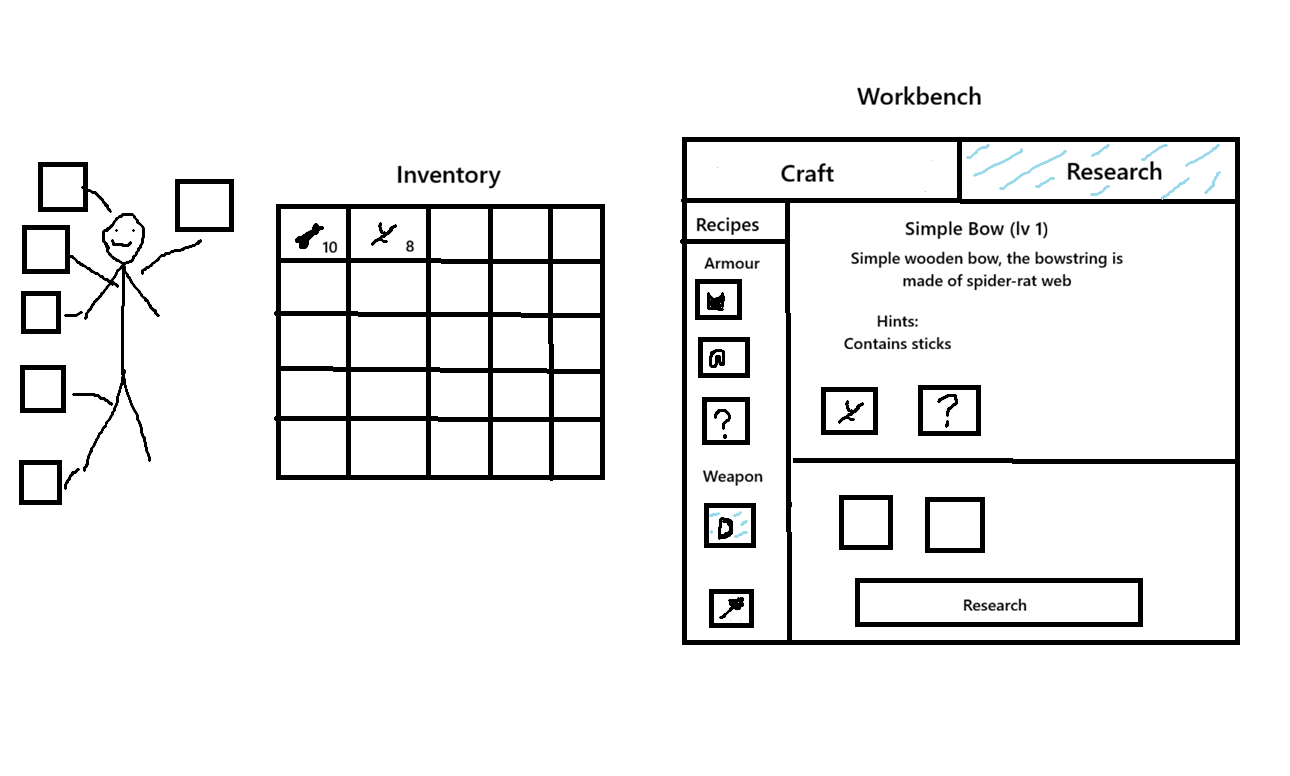
The screen is divided into three sections.
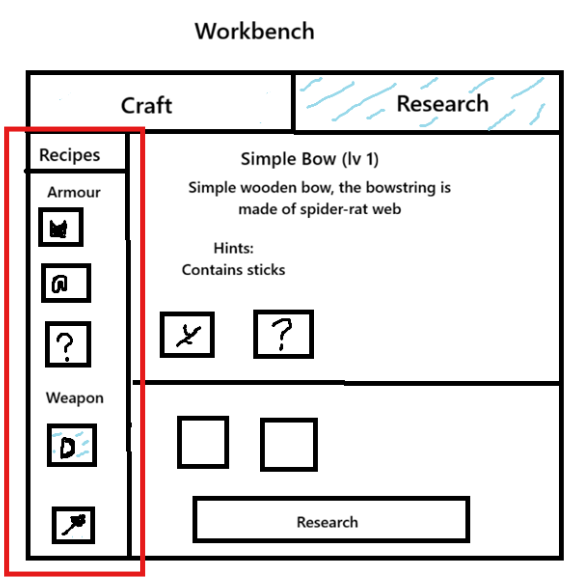
Recipe List (Left)
Displays all recipes known to the player.
Recipes are grouped by category.
Examples:
- Weapons
- Armor
- Consumables
- Ammo
- Furniture
- Resources
Recipes may appear in three different states:
- Learned
- Discovered
- Unknown (hidden)
Selecting a recipe updates the information panel.
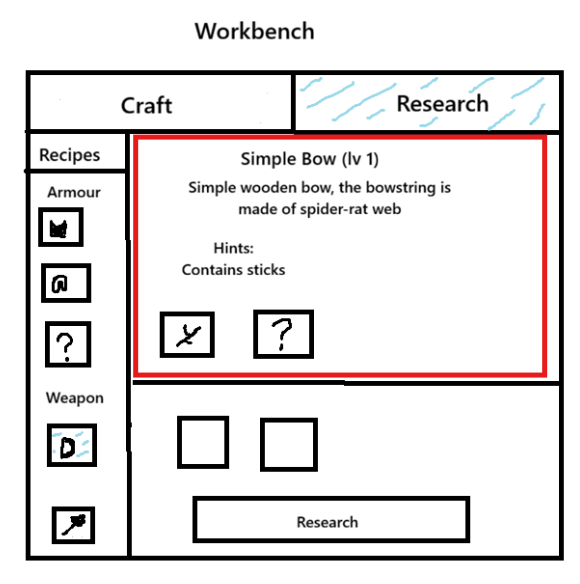
Recipe Information Panel (Right-top)
Displays information about the currently selected recipe.
Possible information includes:
- Recipe name
- Recipe tier
- Recipe description
- Known ingredients
- Unknown ingredients
- Research progress
- Hint information
Example:
Iron Trap\n\nTier 2\n\nA reusable hunting trap reinforced with scrap metal.\n\nKnown Ingredients:\n\n✓ Iron Scrap\n✓ Rope\n?\n?
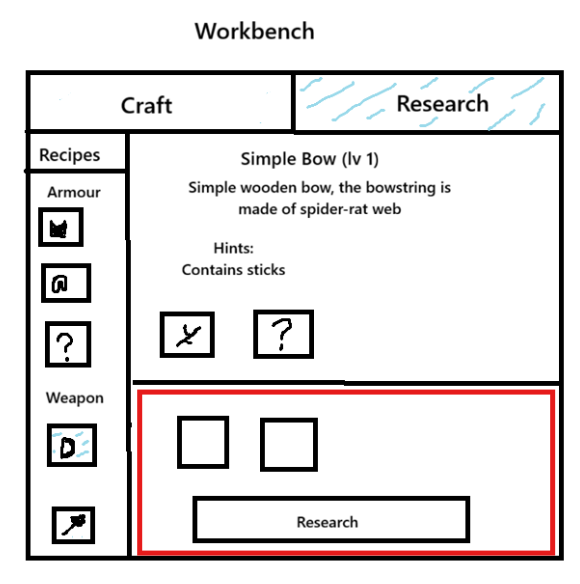
Research Panel (Right-bottom)
Used for recipe research.
The panel contains:
- Research slots
- Research button
- Research result messages
The number of available slots depends on Workbench level.
Recipe Types
Recipes are divided into three categories.
The difference between categories is not complexity but how the player initially learns about them.
Known Recipes
Simple and intuitive recipes.
The player automatically learns these recipes after discovering all required ingredients at least once.
No research is required.
Example:
The player finds:
- Stick
- Stone
The Stone Axe recipe automatically becomes learned.
Discoverable Recipes
The player knows the recipe exists before learning it.
The recipe appears in the recipe list after:
- Quest completion
- NPC dialogue
- Notes
The player can see the recipe entry and gradually reveal missing ingredients.
Example:
Reinforced Bandage\n\nKnown Ingredients:\n\n✓ Cloth\n?\n?
The player knows the item exists and can actively work toward researching it.
Secret Recipes
The player has no knowledge that the recipe exists.
The recipe does not appear anywhere in the UI.
It can only become visible after:
- Successful experimentation.
- Discovery of a rare clue.
- Special quest events.
Example:
The player accidentally combines (for example, not real materials):
- Ancient Core
- Iron Scrap
- Crystal Shard
The game discovers a hidden recipe.
Only then is the recipe added to the journal.
Recipe States
Every recipe exists in one of three states.
Hidden
The player has no information about the recipe.
Result
- Recipe is not shown in the list.
- Recipe can not be selected.
- Recipe can not be tracked.
Discovered
The player knows the recipe exists.
Result
- Recipe appears in the list on research tab, not on crafting tab.
- Some ingredients remain hidden.
- Recipe can not be crafted.
Example:
Iron Trap\n\nKnown Ingredients:\n\n✓ Iron Scrap\n?\n?
Learned
The player knows the complete recipe.
Result
- All ingredients become visible.
- Recipe becomes available in the Crafting tab.
Recipe Fragments
Recipe information can be acquired in pieces.
Each piece automatically updates the corresponding recipe.
A fragment may reveal:
- One ingredient.
- Multiple ingredients.
- Total ingredient count.
- Recipe description.
- Recipe category.
Example:
Player finds a note:
The trap requires rope and scrap metal.
Result:
Iron Trap\n\nKnown Ingredients:\n\n✓ Iron Scrap\n✓ Rope\n?\n?
Research System
Research allows players to discover the full composition of recipes.
Research is performed by choosing discovered recipie and placing materials into Research Slots.
Ingredient order does not matter.
To research secret recipie, player can select any discovered recipie and if items in slots are correct, secret recipie will be learned.
Only ingredient presence is checked.
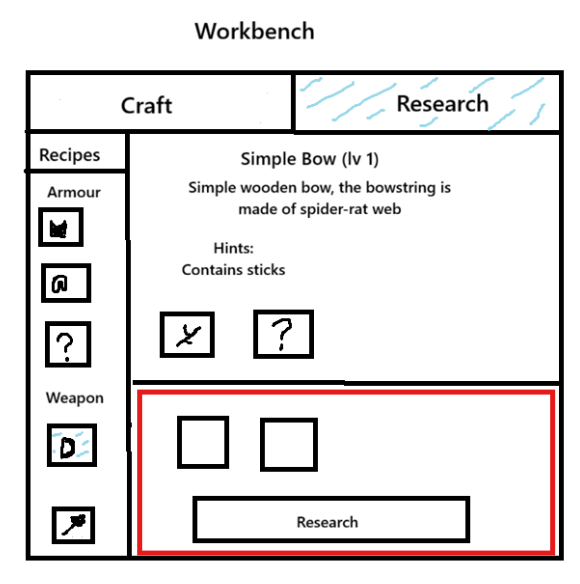
Research Slots
The number of available research slots depends on Workbench level.
| Workbench Level | Research Slots |
|---|---|
| Level 1 | 2 |
| Level 2 | 3 |
| Level 3 | 4 |
Research slots also determine the maximum recipe size that can be researched.
Example:
- 2-slot recipe requires Workbench Level 1.
- 3-slot recipe requires Workbench Level 2.
- 4-slot recipe requires Workbench Level 3.
Research Example
The player has discovered the following recipe:
Stone Spear\n\nKnown Ingredients:\n\n✓ Stick\n?
The player suspects Stone may be required.
Action
Player places via drag and drop from the inventory:
- Stick
- Stone
into the Research Slots and presses Research.
Result
Research Successful\n\nNew Recipe Learned:\nStone Spear
The recipe becomes fully visible:
Stone Spear\n\nIngredients:\n\n1x Stick\n1x Stone
The spear itself is not crafted.
The player must switch to the Crafting tab and craft it normally.
Failed Research
Requirement
The inserted combination does not match any valid recipe.
Action
Player presses Research.
Result
- Research fails.
- One random inserted ingredient may be destroyed.
- Destruction chance depends on Workbench level.
- Failure message is displayed.
Example:
Research Failed\n\nNo matching recipe found.
or
Research Failed\n\n1 matching ingredient detected.